The 2026 World Cup is not just a sporting event; it is a global cultural phenomenon that transcends boundaries and schedules. Because the tournament is hosted across North America—spanning multiple time zones from Vancouver to Mexico City and New York—many fans will find themselves away from their home 4K televisions during crucial matches. Whether you are commuting, at work, or traveling between host cities, Mobile IPTV is the definitive solution for staying connected to the live action.
In 2026, mobile technology has matured to the point where “streaming on the go” no longer implies low-resolution or constant buffering. With the maturity of 5G Standalone (5G SA) networks and the efficiency of modern video codecs, your smartphone is now a high-definition sports hub. This educational guide explores the technical requirements, software configurations, and optimization strategies to build the best mobile IPTV setup for the 2026 tournament.
1. The 5G Revolution and Live Sports
By 2026, 5G coverage has expanded to cover nearly all urban and suburban areas in major participating countries. For World Cup fans, this means three critical technical advantages over previous generations:
- Ultra-Low Latency: 5G networks in 2026 offer latency as low as 5ms to 10ms. This is vital for live sports where every second counts. Lower latency means your mobile stream is closer to the real-life action, preventing “spoilers” from social media notifications.
- Network Slicing: Many carriers now use network slicing to prioritize high-bandwidth video traffic during major events. This ensures that even in a crowded stadium or a busy city center, your IPTV packets are prioritized over standard background data.
- Increased Throughput: Mobile speeds now comfortably exceed 500 Mbps in most 5G zones, making 4K mobile streaming a reality without the need for public Wi-Fi.
2. Data Usage: Calculating Your World Cup “Data Budget”
Streaming live sports is one of the most data-intensive activities for a mobile device. Because football features constant motion, the video bitrate must remain high to avoid “blocky” artifacts. Below is a technical breakdown of how much data you can expect to consume during a single 90-minute World Cup match in 2026.
| Resolution | Avg. Bitrate | Data per Minute | Data per 90-Min Match |
|---|---|---|---|
| SD (480p) | 1.5 Mbps | 11 MB | ~1 GB |
| HD (720p @ 60fps) | 4.5 Mbps | 34 MB | ~3 GB |
| Full HD (1080p @ 60fps) | 8.0 Mbps | 60 MB | ~5.5 GB |
| 4K Ultra HD (2160p) | 25.0 Mbps | 188 MB | ~17 GB |
Educational Tip: If you are on a limited data plan, we recommend setting your player to 1080p. On a screen smaller than 7 inches, the visual difference between 1080p and 4K is minimal, but the data savings are nearly 70%.
3. The Best Mobile IPTV Players for 2026
Your choice of app is the foundation of your mobile setup. In 2026, these players have been optimized for mobile battery efficiency and 5G signal fluctuations.
A. IPTV Smarters Pro (iOS & Android)
IPTV Smarters Pro remains the “universal” choice. Its mobile interface is highly responsive, and it supports a “Master Search” feature that allows you to find matches by team name across all your available channels. It also features a “Picture-in-Picture” (PiP) mode, allowing you to watch the game in a small window while answering messages or checking stats.
B. TiviMate Mobile (Android Only)
While originally a TV-only app, the 2026 mobile version of TiviMate has taken the market by storm. It offers the same broadcast-style EPG (Electronic Program Guide) and is famous for its “Quick Zapping” feature, which reduces the time it takes to switch between channels—perfect for checking the score of a concurrent group-stage match.
C. GSE Smart IPTV (iOS & Apple Watch)
For Apple users, GSE Smart IPTV offers excellent integration with the iOS ecosystem. A unique feature in 2026 is its support for “Live Activities,” which can show the current World Cup score on your lock screen while the stream plays in the background.
4. Optimizing Your Setup for “On the Go” Performance
Streaming a World Cup match puts significant strain on your hardware. Follow these technical optimization steps to ensure your phone survives the full 90 minutes plus extra time.
Battery Management
High-bitrate streaming and 5G connectivity are the two biggest battery drains.
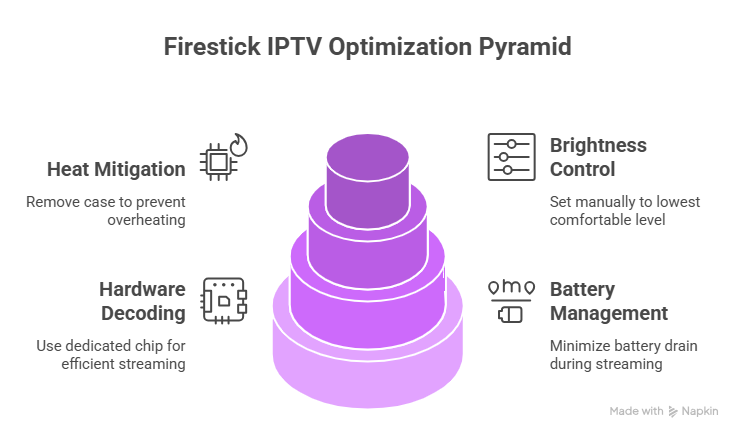
- Hardware Decoding: Ensure your app is set to “Hardware Decoding” (HW) rather than “Software Decoding” (SW). Hardware decoding uses a dedicated chip in your phone’s processor that is far more energy-efficient.
- Brightness Control: Turn off “Auto-Brightness” and set it manually to the lowest comfortable level.
- Heat Mitigation: Streaming 4K over 5G generates heat. If your phone gets too hot, it will “throttle” its speed, causing the stream to lag. Remove your phone case during the match to help with heat dissipation.
Signal Stability with Bonding Apps
If you are on a train or in a car, your 5G signal may drop intermittently. In 2026, many fans use Channel Bonding apps like Speedify. These apps can combine your 5G cellular data with any available public Wi-Fi or even a second SIM card’s data. If one connection fails, the other takes over instantly, ensuring your World Cup stream never stops.
5. The Role of Mobile VPNs in 2026
A Mobile VPN is a critical tool for the traveling fan. Public Wi-Fi at airports, hotels, or cafes often uses “Strict NAT” settings that can block IPTV traffic. A VPN encrypts your packets, making them look like standard web traffic, which allows you to bypass these local network restrictions. Furthermore, if your cellular provider is “throttling” video speeds during peak hours, a VPN can mask the nature of your traffic and potentially restore your full 5G speed.
6. Essential Hardware Accessories for Mobile Fans
To build a truly professional mobile setup for the 2026 World Cup, you should consider these three accessories:
- Power Bank (20,000mAh+): A single 4K match can drain 30-40% of a modern smartphone battery. A high-capacity power bank with USB-C Power Delivery (PD) is essential for back-to-back matches.
- MagSafe or Clip-on Stand: Holding a phone for two hours is tiring and can lead to accidental touches. A stable stand or a MagSafe-compatible ring allows you to watch hands-free on any flat surface.
- 5G Portable Router: If you are traveling in a group, a dedicated 5G mobile hotspot is more efficient than “tethering” from your phone. It preserves your phone’s battery and provides a more stable Wi-Fi 7 signal for multiple devices.
7. Troubleshooting Mobile IPTV on Match Day
If you encounter issues while on the move, follow this rapid-fire checklist:
- Stream is Freezing: Lower the quality from 4K to 1080p or 720p. Mobile screens are small enough that the lower resolution will still look great.
- App Keeps Crashing: Clear the “Cache” in your app settings. Large EPG data from thousands of channels can sometimes clog your phone’s RAM.
- Audio but No Video: This is a “Codec” issue. Switch from Hardware to Software decoding (or vice versa) in your app’s player settings.
Conclusion: The Stadium in Your Pocket
The 2026 World Cup represents the pinnacle of mobile broadcasting technology. With a 5G-ready device, a professional IPTV player app, and a solid data plan, you no longer have to be tied to your living room to experience the drama of the tournament. By understanding the technical nuances of data usage, hardware decoding, and network stability, you can ensure that you have a front-row seat to every goal, regardless of where your 2026 journey takes you.
Planning to stay home for the big games? Read our companion guide on The Best 4K Streaming Devices for World Cup 2026 to optimize your home theater setup.