As the 2026 World Cup approaches, the excitement is building for the first 48-team tournament hosted across North America. For football fans, the goal is clear: a crystal-clear, 4K broadcast with zero buffering. While your IPTV service provides the signal, the hardware you choose acts as the engine. A weak device will struggle to decode high-bitrate 4K streams, leading to frame drops and lag during the most intense moments of the match.
In 2026, the market is filled with streaming sticks, boxes, and “Smart” televisions. This 1,500+ word educational guide compares the top devices—ranging from the budget-friendly Amazon Firestick to the enthusiast-grade NVIDIA Shield and native Smart TV apps—to help you build the ultimate World Cup viewing station.
1. The Best Overall: NVIDIA Shield TV Pro
Even in 2026, the NVIDIA Shield TV Pro remains the gold standard for IPTV. While many newer devices have hit the market, the Shield’s specialized Tegra X1+ processor and superior thermal management make it the most reliable choice for 104 matches of high-action football.
AI-Upscaling for Non-4K Feeds
Many international broadcasters still transmit in 1080p or 720p to save bandwidth. The Shield Pro uses AI-enhanced upscaling to “fill in” the missing pixels, making a standard HD stream look remarkably close to native 4K. This is a game-changer for watching matches from regions where 4K infrastructure isn’t yet fully deployed.
Gigabit Ethernet for 4K Stability
Wireless signals are prone to interference during peak hours. The Shield Pro features a built-in Gigabit Ethernet port, allowing you to bypass Wi-Fi entirely. This ensures a consistent 100Mbps+ pipe for your 4K stream, which is essential for avoiding the “buffering wheel” during a penalty shootout.
2. The Value Champion: Amazon Fire TV Stick 4K Max
The 2026 refresh of the Fire TV Stick 4K Max is the most popular choice for a reason. It offers approximately 85% of the performance of a high-end box at 25% of the cost. For the casual fan who wants a simple, “plug-and-play” experience for the World Cup, this is the device to beat.
Wi-Fi 6E Support
The standout feature of the 4K Max in 2026 is its support for Wi-Fi 6E. This technology opens up the 6GHz spectrum, which is less crowded than the traditional 2.4GHz and 5GHz bands. If you live in an apartment complex where dozens of Wi-Fi signals are competing, Wi-Fi 6E provides a “private lane” for your World Cup data.
The Fire OS Ecosystem
While Amazon’s interface is ad-heavy, it is incredibly fast. Most IPTV apps (like TiviMate) are easily “sideloaded” onto the Firestick, and the hardware is powerful enough to support Multi-View for watching two matches at once without the device overheating.
3. The Professional Pick: Formuler Z11 Pro Max
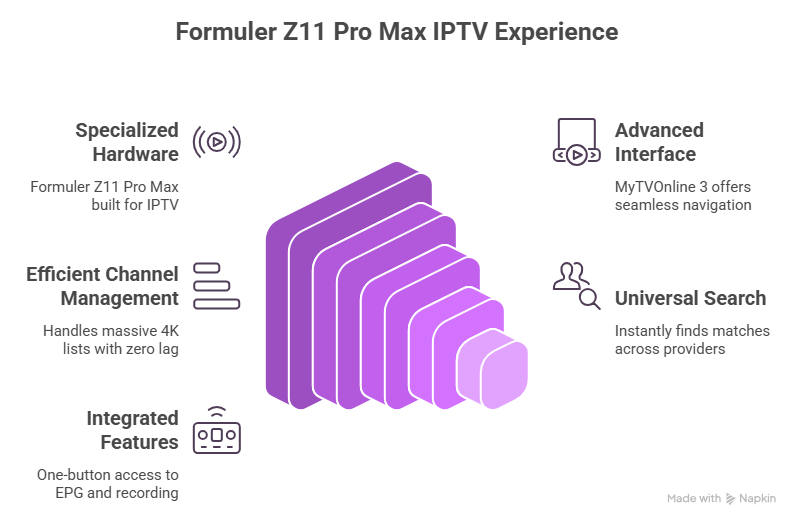
Unlike general-purpose streaming sticks, the Formuler Z11 Pro Max is built specifically for IPTV. It is an industry secret among hardcore sports fans who want a “cable box” experience rather than a “streaming app” experience.
MyTVOnline 3: The Ultimate Interface
The Z11 comes with MyTVOnline 3, which is widely considered the best native IPTV app in 2026. It handles massive 4K channel lists with zero lag and features a “Universal Search” that finds World Cup matches across all your providers instantly. Its integration with the remote control is seamless, offering one-button access to the EPG (Electronic Program Guide) and recording features.
4. The Apple Experience: Apple TV 4K (2025/2026 Edition)
For those already in the Apple ecosystem, the Apple TV 4K is a sleek, ultra-fast option. In 2026, it features the A17 Pro chip, making it the most powerful consumer streaming device on the market in terms of raw CPU speed.
Stability and Privacy
The tvOS interface is famous for its lack of advertisements and its extreme stability. If you use apps like iPlayTV or IPTV Smarters on Apple TV, you will notice that the app almost never crashes, even during high-bandwidth events. Furthermore, Apple’s “Private Relay” and robust VPN support ensure your ISP cannot easily throttle your World Cup stream.
5. Built-in Smart TV Apps: Convenient but Risky
Most fans will naturally try to watch the World Cup using the apps built into their Samsung (Tizen), LG (webOS), or Sony (Google TV) televisions. While convenient, this is often the most problematic way to watch high-bitrate live sports.
The Technical Bottleneck
The processors inside most Smart TVs are designed to be “just good enough” to run menus. They often lack the RAM (Random Access Memory) required to store a large video buffer. When the 2026 World Cup feed hits 25 Mbps, the TV’s processor can become overwhelmed, leading to app crashes or “stuttering” video where the audio and video lose synchronization.
Limited Codec Support
Modern 4K IPTV streams use the AV1 or HEVC codecs. Older Smart TVs (pre-2024) may not have hardware-level support for these, forcing the TV to use “Software Decoding.” This generates immense heat and leads to the TV slowing down mid-match. If you are serious about the World Cup, we recommend using your Smart TV as a display only and letting an external box handle the processing.
Technical Comparison Table for 2026
| Feature | NVIDIA Shield Pro | Fire TV Stick 4K Max | Apple TV 4K | Smart TV Apps |
|---|---|---|---|---|
| Processor | Tegra X1+ (AI Focus) | Quad-Core 2.0 GHz | A17 Pro / A18 | Varies (Usually Low) |
| RAM | 3 GB | 2 GB | 4 GB | 1 GB – 2 GB |
| Ethernet | Gigabit (Built-in) | Requires Adapter | Gigabit (Built-in) | 10/100 (Slow) |
| Wi-Fi | Wi-Fi 5 (AC) | Wi-Fi 6E | Wi-Fi 6E | Varies |
| IPTV Rating |  | | | |
6. Crucial Hardware Accessories for 2026
To get the best performance out of these devices, you should consider two essential accessories:
- OTG (On-The-Go) Cable: For Firestick users, this allows you to plug in a USB drive for recording matches or an Ethernet adapter for a stable connection.
- High-Speed HDMI 2.1 Cable: To view 4K at 60 FPS with HDR10+, your cable must support at least 18 Gbps (HDMI 2.0) or 48 Gbps (HDMI 2.1). Using an old cable from 2015 will cause “black screens” or “digital snow” during the match.
Conclusion: The Verdict for World Cup 2026
The 2026 World Cup is a celebration of sport and technology. If you want the absolute best experience with 4K upscaling and Gigabit stability, the NVIDIA Shield TV Pro is the winner. If you are on a budget but still want the latest Wi-Fi 6E technology, the Amazon Fire TV Stick 4K Max is your best bet. Avoid relying on your Smart TV’s internal apps if you want to avoid the frustration of mid-match crashes.
Choose your hardware today, set up your Ethernet connection, and prepare your favorites list. The 2026 World Cup is coming—make sure your setup is ready to deliver every goal in breathtaking detail.