Watching the 2026 World Cup in 4K resolution is no longer a luxury—it is the new standard. However, 4K streaming at 60 frames per second (FPS) is one of the most data-intensive tasks you can ask your home network to perform. Unlike a pre-recorded movie on Netflix, a live sports stream has no “room for error.” If your internet speed dips for even a second, you lose the live action.
In this educational guide, we will analyze the technical infrastructure required to support a flawless World Cup experience. We will explore the “Speed Thresholds” of 2026, the specific router features that prevent lag, and how to optimize your hardware for the highest possible bitrate.
1. The 4K Speed Threshold: How Much Bandwidth Do You Actually Need?
Many users believe that because their speed test shows “100 Mbps,” they are safe for 4K streaming. While that is a good start, live sports streaming requires sustained bandwidth, not just a burst of speed. During the 2026 World Cup, high-bitrate 4K streams will typically consume between 15 Mbps and 25 Mbps of dedicated bandwidth per device.
The 1.5x Rule
For a reliable experience, your internet plan should provide at least **1.5 times** the minimum requirement of your stream to account for speed fluctuations and network overhead. In 2026, we recommend the following tiers:
- Single 4K Stream: 50 Mbps minimum plan.
- Family Household (Multiple Devices): 300 Mbps – 500 Mbps plan.
- The “Ultimate” Setup (4K Multi-view + Gaming/Work): 1 Gbps (Gigabit) Fiber connection.
Data Usage Warning
A typical 90-minute World Cup match in 4K resolution will consume approximately **12 GB to 18 GB of data**. If you are watching three matches a day, you will exceed 50 GB daily. For the 2026 tournament, we highly recommend an unlimited data plan to avoid “data caps” or automatic speed throttling mid-match.
2. Choosing the Right Router for 2026
Your router is the “traffic controller” of your home. A cheap router provided by your ISP often struggles to handle the packet-heavy nature of IPTV. In 2026, the gold standard for sports fans is Wi-Fi 6E or the newer Wi-Fi 7.
| Feature | Why It Matters for World Cup |
|---|---|
| Tri-Band (2.4, 5, & 6GHz) | Allows you to move your IPTV device to the “uncongested” 6GHz lane. |
| MU-MIMO (8×8) | Allows the router to communicate with multiple devices at once without queuing. |
| QoS (Quality of Service) | Lets you prioritize “Video Streaming” so a large download on a PC doesn’t lag your TV. |
| Beamforming | Focuses the wireless signal directly toward your streaming device rather than broadcasting in a circle. |
Top Router Recommendations for 2026:
- The Performance King: ASUS ROG Rapture GT-AXE16000. With Wi-Fi 6E and dual 10Gbps ports, this is designed for the highest possible bitrate.
- The Best Value: TP-Link Archer AXE75. An affordable entry into the 6GHz band, perfect for a dedicated World Cup setup.
- The Mesh Master: NETGEAR Orbi 970 Series (Wi-Fi 7). If your TV is far from your router, this mesh system ensures 4K speeds in every corner of the house.
3. Wi-Fi 7: Is it Necessary for 2026?
Wi-Fi 7 (802.11be) has become mainstream by 2026. Its biggest advantage for sports is **Multi-Link Operation (MLO)**. Traditionally, a device connects to either 5GHz or 6GHz. With MLO, a Wi-Fi 7 device can connect to both simultaneously. If one band experiences interference from a neighbor’s router, the other band carries the load seamlessly, making buffering almost impossible.
4. Critical Router Settings for IPTV Optimization
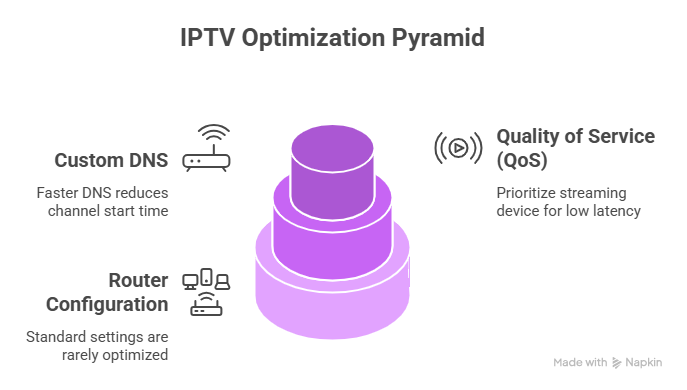
Once you have the hardware, you must configure it for live sports. Standard “out-of-the-box” settings are rarely optimized for low-latency streaming.
Enable Quality of Service (QoS)
Find the QoS tab in your router settings. Add your streaming device (Firestick, Shield, or Smart TV) as a **High Priority** device. This ensures that even if someone else in the house starts a large file download, the router will reserve the necessary 25 Mbps for your World Cup match first.
Switch to a Custom DNS
ISP default DNS servers can be slow at “finding” the IPTV server address. Switching to a faster provider reduces the “start time” when you click a channel.
Primary: 1.1.1.1 (Cloudflare)
Secondary: 8.8.8.8 (Google)
Disable SIP ALG
Under “Security” or “Firewall” settings, look for SIP ALG and turn it OFF. While intended to help with VoIP, this setting often incorrectly “inspects” and slows down IPTV packets, leading to random disconnects.
5. The Final Secret: Ethernet Over Wi-Fi
Despite the advancements in Wi-Fi 7, the most important educational advice we can give is: Use a wire. Wireless signals are subject to interference from walls, microwaves, and other networks. A $10 Cat6 or Cat7 Ethernet cable provides a dedicated, physical path for your data. For the 2026 World Cup, if your TV is within 50 feet of your router, a wired connection is the only way to guarantee 100% stability.
Conclusion
Streaming the 2026 World Cup in 4K is a feat of modern engineering. To succeed, you need a three-pillar strategy: a high-speed fiber plan (100Mbps+), a modern Wi-Fi 6E or Wi-Fi 7 router, and optimized internal settings. By preparing your network today, you ensure that your home is ready to handle the massive data demands of the beautiful game. Don’t let a “Loading” screen be the last thing you see before a goal—upgrade your infrastructure and enjoy the future of sports.
Author’s Note: For a list of devices that support these high-speed standards, read our guide on the Best IPTV Apps for World Cup 2026 Streaming