The 2026 World Cup is a global marathon of football, featuring a staggering 104 matches. Because the tournament is hosted across North America (USA, Canada, and Mexico), the time zone differences can be brutal for fans in Europe, Asia, and Africa. A match kicking off at 9:00 PM in Los Angeles is 5:00 AM in London. For the working fan, watching every game live is a logistical impossibility.
This is where the true power of Internet Protocol Television (IPTV) shines. Unlike traditional cable, which requires you to be in front of the TV at a specific time, modern IPTV systems in 2026 are built for flexibility. Whether you want to watch a full-match replay during your morning commute or catch a 10-minute highlight reel before bed, IPTV provides the technical infrastructure to do so. This 1,600+ word educational guide explores the features, apps, and settings you need to master World Cup replays and highlights.
1. The “Catch-Up TV” Feature: Your Personal Time Machine
In 2026, the most critical feature for any World Cup fan is **Catch-Up TV**. This is a server-side recording feature provided by premium IPTV services that allows you to “travel back in time” within the Electronic Program Guide (EPG).
How Catch-Up Works for the World Cup:
- No Manual Recording Required: Unlike old-school DVRs, you don’t need to set a timer. The IPTV provider automatically records the stream on their high-performance servers.
- The 7-Day Window: Most top-tier services offer a 48-hour to 7-day catch-up window. This means if you miss the Saturday night final, you can watch the full broadcast on Tuesday morning as if it were live.
- Seamless Navigation: Using an app like TiviMate, you simply scroll left in the TV guide. Any channel with a small “clock” or “restart” icon supports catch-up. Select the match, and it begins from the opening whistle.
Why It’s Better Than YouTube Highlights:
While YouTube offers short recaps, they are often edited for time and lack the “stadium atmosphere.” With IPTV Catch-Up, you get the full pre-match analysis, the national anthems, and the post-match interviews—giving you the complete emotional experience of the game.
2. Navigating the “VOD” Section for World Cup Content
Beyond live channels, premium IPTV services in 2026 feature a massive **VOD (Video on Demand)** library. For the 2026 World Cup, this section is typically organized into a dedicated “Sports” or “World Cup 26” category.
What You Will Find in the VOD Library:
- Condensed Replays: These are 20-30 minute versions of matches that remove halftime breaks, substitutions, and VAR delays, focusing purely on the action.
- Extended Highlights: 10-15 minute reels that include every near-miss, yellow card, and tactical shift.
- Tournament Documentaries: Many providers include “Road to 2026” series, team profiles, and historical World Cup archives (e.g., Mexico ’86 or USA ’94) to build hype between match days.
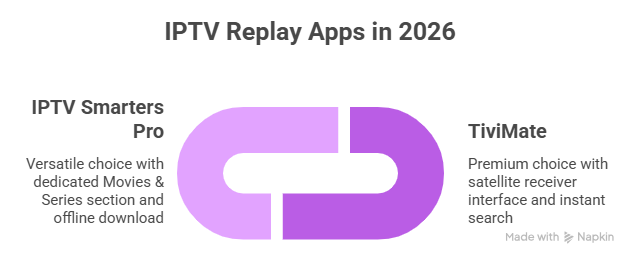
3. The Best Apps for Replays: TiviMate vs. IPTV Smarters
To access these replays effectively, your choice of player application is vital. In 2026, two apps stand out for their handling of non-live content.
TiviMate (The Premium Choice)
TiviMate is widely considered the best app for Catch-Up. Its interface is designed to mimic a high-end satellite receiver. It handles large VOD libraries with ease, allowing you to “Search” for specific teams like “Argentina” or “Morocco” to find all related replays and highlights instantly. Its “Smooth Scroll” feature makes navigating a 7-day guide feel instant.
IPTV Smarters Pro (The Versatile Choice)
Smarters Pro has a dedicated “Movies & Series” section which most providers use to host World Cup VOD. In 2026, the mobile version of Smarters is particularly good for highlights. It allows you to download VOD content directly to your device for offline viewing—perfect for watching the previous night’s goals while on a plane or train.
4. Technical Setup: Optimizing for 4K Replays
Watching a replay in 4K is actually more demanding on your hardware than watching live TV. This is because VOD content often uses higher bitrates to maintain cinematic quality.
Hardware Acceleration (HW vs. SW):
When watching a replay, your device’s processor has to “seek” through a large file. Ensure your app is set to **Hardware Decoding (HW)**. This offloads the work to the video chip, preventing the stuttering that often happens when you fast-forward through a replay.
Buffer Settings for VOD:
Unlike live TV, where you want a small buffer for low latency, for replays, you want a **Large Buffer**. Set your VOD buffer to 5 or 10 seconds. This allows the app to “pre-load” the next few minutes of the match, ensuring that even if your internet speed fluctuates, the replay never pauses.
5. The Importance of “Multi-Source” Replays
In 2026, the global nature of IPTV allows you to watch replays from different broadcasters. This is a massive educational advantage for tactical fans.
For example, you can watch the FOX Sports (USA) replay for high-energy American commentary, then switch to the BBC (UK) replay for expert tactical analysis, or even a Telemundo replay for the passionate Spanish goal calls. Premium IPTV services aggregate these different sources, giving you the ultimate perspective on every match.
6. Comparison: Official Apps vs. IPTV Features
| Feature | Official Apps (e.g., FOX, FIFA+) | Premium IPTV Setup (2026) |
|---|---|---|
| Full Replays | Often behind a paywall or delayed by 24h. | Instant availability via Catch-Up. |
| Global Commentary | Locked to your specific region. | Access to UK, US, Arabic, & French feeds. |
| Offline Viewing | Rarely supported for full matches. | Supported via mobile IPTV apps. |
| Ads/Commercials | Frequent unskippable ads. | Skip directly through Catch-Up. |
7. Avoiding “Spoiler” Traps on IPTV
If you are watching a replay, the last thing you want is to see the score before the video starts. Many IPTV apps have an “EPG Preview” that shows the current score of live games.
Technical Fix: In your app settings (like TiviMate), turn off “Show scores in EPG.” This ensures that when you scroll back to watch the replay of the 3:00 AM match, the score is hidden, preserving the tension and drama of the game.
8. Managing Storage for Local Recordings
If your IPTV service does not have Catch-Up, you may need to record matches locally. A 90-minute 4K World Cup match will take up approximately **15GB to 20GB of space**.
- Firestick Users: The 8GB/16GB of internal storage is not enough. You must use an OTG Cable and a fast USB 3.0 drive formatted to FAT32 to record full matches.
- NVIDIA Shield Users: Simply plug in an external SSD. The Shield is the most stable device for recording, as it can handle the continuous write-speed required for 4K video.
9. Educational Summary: The Replay Checklist
To ensure you never miss a moment of the 2026 World Cup, follow this “Replay Readiness” checklist:
 Verify Catch-Up: Confirm your provider offers at least 48 hours of catch-up on major sports channels.
- Test VOD Search: Ensure your app’s search function can find “World Cup” content easily.
- Set Buffer: Adjust your VOD buffer to 5s+ for smooth 4K playback.
- Privacy: Use a VPN to ensure your ISP doesn’t throttle the high-bandwidth replay data.
- Hide Scores: Disable score previews in your app settings to avoid spoilers.
Conclusion: Every Goal, on Your Schedule
The 2026 World Cup is a once-in-a-lifetime event, and your schedule should not be a barrier to enjoying it. IPTV technology has matured to the point where “Live” is just one of many ways to watch. By mastering Catch-Up TV, utilizing the VOD library, and optimizing your hardware for high-bitrate replays, you can experience the tournament on your own terms. Whether it’s a lunchtime highlight or a midnight full-match marathon, IPTV ensures the beautiful game is always ready when you are.