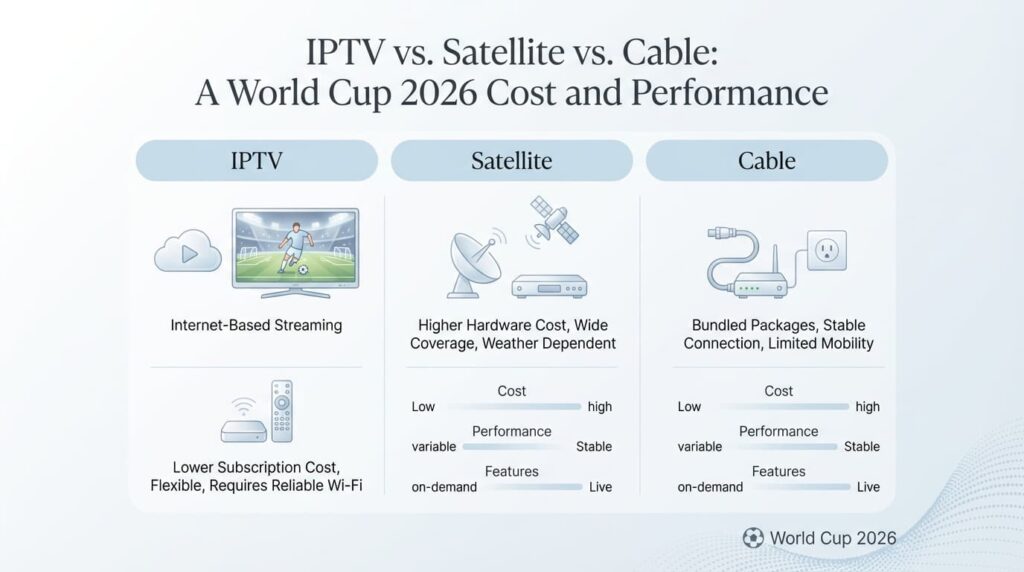
IPTV vs. Satellite vs. Cable: A World Cup 2026 Cost and Performance Analysis
As we approach the 2026 World Cup, the battle for the living room has reached a fever pitch. Fans are no longer just asking *what* to watch, but *how* to watch it. For decades, Cable and Satellite were the only reliable ways to catch live sports. However, the rise of high-speed fiber internet and advanced encoding has allowed Internet Protocol Television (IPTV) to challenge the status quo. In 2026, the decision to choose one over the other isn’t just about price; it’s about latency, reliability, and the sheer volume of content. This educational analysis breaks down the costs and performance metrics of the three major broadcasting technologies to help you decide which setup is “match-ready” for the summer of 2026. 1. The Cost Breakdown: Subscription vs. Value The most immediate difference between these technologies is the impact on your monthly budget. In 2026, traditional providers have faced rising licensing costs, which are often passed down to the consumer. Provider Type Avg. Monthly Cost (2026) Setup / Hidden Fees Contract Length Cable (e.g., Xfinity, Spectrum) $100 – $180 Equipment rental ($15/mo), Local sports fees. 0 – 12 Months Satellite (e.g., DIRECTV, DISH) $90 – $170 Professional installation, DVR fees ($10-15/mo). 24 Months (Standard) Premium IPTV $12 – $30 None. Uses existing hardware. No Contract (Month-to-Month) The Takeaway: IPTV offers a 70-80% cost saving over traditional methods. While Cable and Satellite often bundle internet or phone services, the standalone cost of TV remains significantly higher than an IPTV subscription, which leverages your existing broadband connection. 2. Performance: Resolution and Frame Rates For a World Cup match, resolution (4K) and frame rate (60fps) are critical. If the ball looks like a blurry streak across the screen, the technology has failed. Satellite: Traditionally the leader in 4K, Satellite offers a dedicated bandwidth pipe. However, in 2026, most satellite providers only offer a limited number of “true 4K” channels, with the rest being upscaled 1080i. Cable: Often the most “compressed” of the three. Due to aging physical infrastructure in some regions, cable providers often compress signals to save space, which can lead to “artifacting” during high-motion sports. IPTV: Because it is software-defined, IPTV can deliver True 4K at 60fps. Modern providers in 2026 use HEVC (H.265) encoding, which provides higher quality at lower bitrates, allowing for a “stadium-clear” image on high-speed connections. 3. The “Latency Gap”: Will You Hear the Neighbors Cheer? Latency is the delay between the real-life action and the image on your screen. In previous years, streaming was notoriously 30-60 seconds behind. By 2026, this gap has closed significantly. Satellite & Cable: These remain the fastest, with latencies typically between 1 and 3 seconds. They are considered “near-live.” Advanced IPTV: Using Low-Latency HLS (LL-HLS) and UDP delivery, top-tier IPTV services in 2026 have reduced delay to 5-8 seconds. While technically “slower” than cable, it is fast enough that you won’t hear spoilers from next door unless your neighbors are literally in the stadium. 4. Reliability: Weather vs. Web Each technology has a “weak point” that can cause your screen to go black during a crucial World Cup match. Satellite “Rain Fade”: Satellite signals are physical waves traveling through the atmosphere. Heavy rain or storm clouds can interrupt the signal, a phenomenon known as “Rain Fade.” If a thunderstorm hits during the World Cup final, satellite users are at risk. Cable “Physical Cuts”: Cable is very stable but vulnerable to physical local outages (downed lines or construction accidents). If your local node goes down, your whole neighborhood loses service. IPTV “Server Load”: IPTV depends on two things: your internet speed and the provider’s server capacity. In 2026, premium providers use Load Balancing and CDNs (Content Delivery Networks) to prevent crashes during peak events like the World Cup. As long as you have 25 Mbps or more, your risk is minimal. 5. Channel Variety and Global Access This is where IPTV becomes the undisputed winner for the 2026 World Cup. The 2026 tournament features 48 teams from every corner of the globe. Cable/Satellite: You are restricted to the channels available in your specific country. If you want to hear the commentary in French, Spanish, or Arabic, you often have to pay for expensive “International” add-on packs. IPTV: Offers a global “Passport.” You can switch from the US broadcast to the UK’s BBC, then to a Middle Eastern beIN Sports feed in seconds. You get access to 15,000 to 40,000+ channels, ensuring you can follow the World Cup exactly how you want. Summary: Which is Right for You? Choose Cable or Satellite if: You live in a rural area with internet speeds below 15 Mbps. You want a “triple-play” bundle (Internet + Phone + TV) and don’t mind long-term contracts. You absolutely cannot tolerate a 5-second delay. Choose IPTV if: You want to save over $1,000 per year on entertainment. You want 4K quality with no hardware clutter or professional installation. You want global access to every World Cup match from every country. You prefer a month-to-month commitment with no strings attached. Final Verdict for 2026 The 2026 World Cup is a digital-first event. While Satellite and Cable provide a traditional, “safe” experience, the flexibility, cost-efficiency, and sheer variety of IPTV make it the superior choice for the modern fan. By ensuring you have a high-speed internet connection and a premium IPTV player, you can enjoy a more immersive, global, and affordable World Cup than ever before. Check out our next article: “The Best Internet Speed and Routers for 4K World Cup Streaming” to ensure your home network is ready for the action.